
Wuuk
Wuuk LabsHouse & Home
3.8222.00 Reviews
- Version
- 4.2.5
- Installs
- 100.00K
- Age Rating
- Everyone
Screenshots
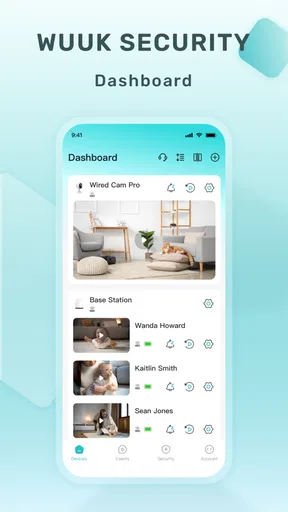
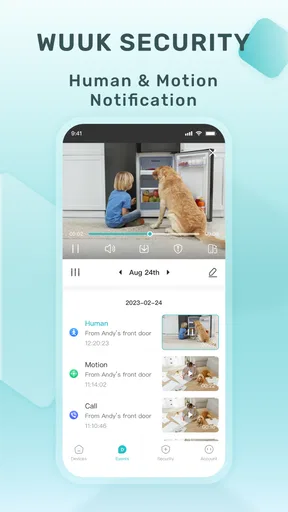
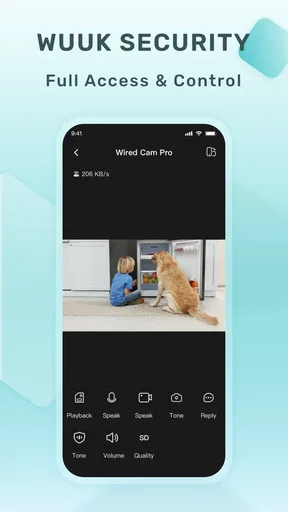
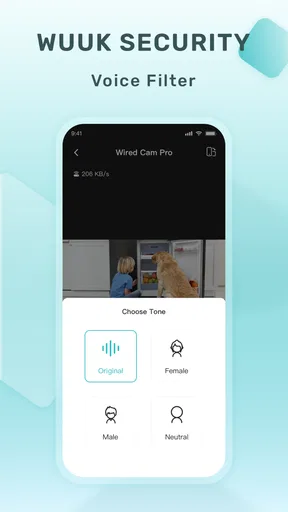
Our Review of Wuuk
 Analysis by Appyee
I look at Wuuk as a companion app for people who already own, or are considering, Wuuk home devices—not as a general smart-home dashboard. That distinction matters: its central job is to bring those devices together so you can access and control them from your phone. If you want one place to check a compatible device while away from home, that focus can be useful. If you expect an app that manages equipment from many brands, I would look elsewhere before building your setup around it.
Wuuk is a free House & Home app from Wuuk Labs, with optional in-app purchases listed from $3.99 to $294.99 per item. It is rated for Everyone, and it has a 3.9 average from 708 ratings, alongside 212 written reviews and over 50,000 installs. Those figures suggest a meaningful user base, but the rating also makes me wary of assuming that every setup feels effortless. The current version is 4.2.5, and Android users need version 5.1 or later.
The value is in having one control point
The useful idea behind Wuuk is straightforward: rather than treating each WUUK device as something you only interact with at the device itself, the app gives you a phone-based place to access and control your connected equipment. That can make home monitoring feel less tied to being physically near a screen or control panel. For a household with compatible devices, a central app is easier to remember than a collection of separate ways to check on the home.
I would think of it as a focused remote-control layer, not a promise that every part of a smart home will work together. Before choosing it, I would check whether the particular Wuuk hardware I plan to use fits my needs and whether I am comfortable keeping that part of my setup within one manufacturer's ecosystem. The convenience comes from that shared home base; the trade-off is that the app's usefulness depends on owning WUUK equipment.
How I would use it during an ordinary day
Picture leaving for work and realizing you are unsure whether a delivery arrived. Instead of waiting until you get home, you can open the app and access a connected device from your phone. The same habit can help when you are in another room and want to check a device without walking over to it. What matters in these moments is not a long feature list but how quickly you can reach the right device and understand what it is showing or doing.
For that reason, I would give the app a small practical test after setup: place the device where you expect to use it, open the app from the same sort of network and location you will normally rely on, and see whether the control you need is easy to find. Then try it again when you are away from home. A setup that feels clear in the living room may feel less convenient when you are in a hurry, so checking both situations is more useful than simply confirming that the app opens.
I would also keep expectations modest about what a phone app can solve. It gives you a way to reach compatible devices, but it does not remove the need to choose sensible device placement or check that the equipment is configured properly. If a camera or other connected product cannot cover the area you care about, a tidy interface will not fix that limitation. In my view, the best results come when the app is treated as part of a home setup rather than as a substitute for planning one.
Where it differs from broader smart-home apps
Compared with a general smart-home app, Wuuk's appeal is its narrower relationship with WUUK devices. A broader platform may be the better choice for someone who already has products from several manufacturers and wants one control scheme across all of them. I would not pick this app on the assumption that it will unify unrelated brands. On the other hand, someone who is choosing compatible WUUK equipment may prefer a dedicated place to manage it instead of adding another platform simply for the sake of a larger feature set.
There is a practical trade-off in that choice. A focused app can keep the job easy to understand, but it makes your experience more dependent on the manufacturer's devices and app support. If you are still comparing hardware, decide first which products suit your home, then consider whether their companion app is comfortable enough for everyday use. Starting with the app name alone is the wrong order; the device and the job you need it to do should lead the decision.
Who is likely to get the most from it
I would recommend giving Wuuk a look if you own compatible devices and want a direct way to access or control them from your phone. It may also suit someone who is new to connected home equipment and would rather begin with one manufacturer's ecosystem than compare a long list of platforms. The app is free to install, but its practical value is tied to the equipment you use, and optional purchases mean it is sensible to review any costs shown in the app before committing to them.
I would skip it if you have no WUUK hardware, want a single dashboard for mixed brands, or do not want your home setup to depend on a dedicated companion app. I would also avoid choosing it solely because remote access sounds reassuring: first decide what you actually need to check or control, and whether a compatible device can do that job. That little bit of planning helps separate a useful daily tool from an app that would just sit on your phone.
Hey there! So, I recently got my hands on this nifty app called Wuuk, and I've got to say, it's quite the game-changer. If you're into smart home gadgets and security, you might want to stick around for this one. Let's dive into what makes Wuuk a must-have on your smartphone.
Getting Started with Wuuk
First things first, setting up Wuuk is a breeze. The app is available for both Android and iOS, so you can easily find it in your app store of choice. Once downloaded, the installation process is straightforward. The app guides you with clear instructions, and before you know it, you're all set to start monitoring your home.
The app connects seamlessly with your Wuuk smart devices, like their video doorbells and security cameras. All you need is a strong Wi-Fi connection, and you're good to go. Trust me, even if you're not the most tech-savvy person, you'll find this process as smooth as butter.
A Sleek and Intuitive Interface
Now, let's talk about user experience. The interface of Wuuk is sleek and intuitive. Everything is laid out in a way that just makes sense. You can easily navigate through different tabs to access your devices, check recent activities, and tweak settings. I particularly love how responsive the app is; there's no lagging or freezing, which is a huge plus in my book.
One of the standout features is the live view. You can tap into real-time footage from your devices with just a tap. It's perfect for those moments when you hear a noise outside and want to quickly check what's going on without leaving the comfort of your couch.
Features that Stand Out
Alright, let's get into the good stuff – the features. Wuuk offers a plethora of functionalities that make it stand out from other security apps. For starters, the motion detection is top-notch. You can customize the sensitivity levels, so you won’t get unnecessary alerts every time a leaf blows by.
Another feature I find incredibly useful is the two-way audio. Imagine being able to talk to someone at your doorstep even when you're miles away. It’s like having a personal intercom system right on your phone. Plus, the audio quality is crystal clear, which makes communication hassle-free.
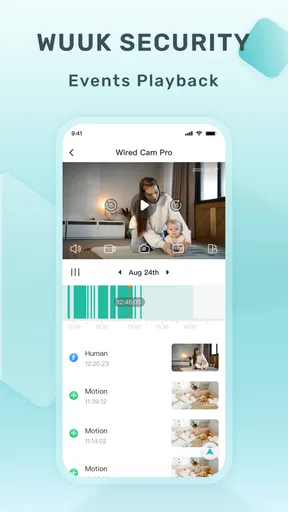
The app also keeps a log of all activities, which is super handy if you need to review past events. You can even download clips for later use. Privacy is a big deal, and Wuuk takes it seriously by ensuring all your data is encrypted and secure.
Why Wuuk is Worth Your Time
So why should you consider Wuuk? Besides its user-friendly interface and robust features, it’s incredibly reliable. The app updates are regular, ensuring that you always have the latest security patches and improvements. Plus, the community support is fantastic. There's a whole network of users and a responsive support team ready to assist with any issues you might encounter.
Let's not forget the peace of mind that comes with knowing your home is secure. Whether you're at work, on vacation, or just lounging at home, Wuuk provides that extra layer of security we all need in today's world.
In conclusion, if you're looking for a reliable, feature-packed smart home security app, Wuuk should definitely be on your radar. It's a perfect blend of functionality and ease of use that makes managing your home security a breeze. Give it a shot, and you might find it to be just what you needed.
Verdict
Strengths of Wuuk
- User-friendly interface for easy navigation.
- High-quality video resolution enhances clarity.
- Customizable notifications for specific events.
- Easy integration with smart home devices.
- Affordable pricing compared to competitors.
Limitations of Wuuk
- Limited cloud storage options available.
- Occasional connectivity issues reported.
- Requires a strong Wi-Fi signal for optimal use.
- No support for advanced automation features.
- Mobile app updates can be infrequent.
Similar Picks in This Category
View All
Universal TV Remote Control
CodeMatics Media Solutions3.9

AlfredCamera Home Security app
Alfred Systems Inc.4.7

Planner 5D: AI Home Design
Planner 5D4.5

Universal Tv Remote-Cast to TV
One Music Player4.1

Zillow: Homes for Sale & Rent
Zillow Group4.8

99acres Buy/Rent/Sell Property
infoedge.com4.3
Frequently Asked Questions
What is Wuuk and what features does it offer?
Wuuk is a comprehensive security app designed for home monitoring. It offers features such as live video streaming, motion detection alerts, and cloud storage for recorded footage. The app is compatible with Wuuk’s range of smart cameras and doorbells, providing users with a seamless way to keep an eye on their property remotely.
Is Wuuk compatible with both Android and iOS devices?
Yes, Wuuk is compatible with both Android and iOS devices. The app is available for download on the Google Play Store for Android users and the App Store for iOS users, ensuring a wide range of users can benefit from its security features regardless of their smartphone operating system.
Does Wuuk require a subscription for full functionality?
While Wuuk offers many features for free, such as live streaming and motion alerts, additional functionalities like extended cloud storage may require a subscription. Users have the choice to opt for a subscription plan to enhance their security setup with added features and extended storage capabilities.
How does Wuuk ensure the privacy and security of user data?
Wuuk employs advanced encryption protocols to safeguard user data. The app ensures that all video feeds and personal information are securely stored and transmitted. Additionally, Wuuk regularly updates its security features to protect against potential threats, maintaining user privacy and data integrity.
Can Wuuk be integrated with other smart home devices?
Yes, Wuuk can be integrated with various smart home ecosystems, including Amazon Alexa and Google Assistant. This allows users to control their Wuuk devices using voice commands and create a more interconnected smart home environment, enhancing overall convenience and security.
